1. Log in to your cPanel account.
2. In the Databases section, click on MySQL Databases.

3. Under Current Databases, you can see a list of all your databases. Locate the database you want to remove and click on Delete.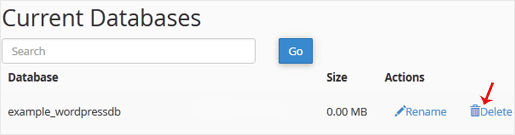
4. Click on Delete Database.

1. Log in to your cPanel account.
2. In the Databases section, click on MySQL Databases.
3. Under Current Databases, you can see a list of all your databases. Locate the database you want to remove and click on Delete.
4. Click on Delete Database.
Fiecare site are o poveste. HostCircuit se asigură că povestea ta rulează fără întreruperi. Găzduire web inteligentă, suport dedicat și performanță pe care te poți baza.
Live Chat
Strada Barsei, nr. 14
Oradea, Jud. Bihor

Telefon: 0749 143143



