
• 0 Coș de cumpărături
  • Contul meu
    • Autentificare
    • Ai uitat parola?
  • Acasă
  • Magazin
    • Răsfoiți tot
    • WebHosting
    • ResellerHosting
    • Monitorizarea site-ului și a serverului
    • -----
    • Înregistrare domeniu nou
    • Transfer domenii
  • Anunțuri
  • Biblioteca de cunoștințe
  • Starea sistemelor
  • Contact
  • Mai multe

Biblioteca de cunoștințe

HostCircuit îți pune la dispoziție servicii de găzduire web moderne, cu cPanel ușor de folosit, LiteSpeed pentru încărcare rapidă, CloudLinux pentru funcționare stabilă și BitNinja pentru securitate sporită. Soluția potrivită pentru afacerea ta sau pentru site-ul tău.

  1. Portal clienți
  2. Biblioteca de cunoștințe
  3. WordPress
  4. How to Delete Categories in WordPress

  Categorii

Backup/Restore
4
Cloudflare (cPanel)
9
CloudLinux (cPanel)
10
cPanel - Control Panel
24
Databases
11
DirectAdmin
48
DNS - Nameservers
6
Domain Management
10
Email
17
FTP
9
Installing a Control Panel
6
Mail Filters & SPAM
8
Mobile
11
Others
3
PayPal
7
Plesk
47
Security
10
SiteWorx (Control Panel)
58
Softaculous
69
SolusVM
18
SSL
5
Virtualizor
19
WHM
18
WordPress
17

  Categorii

  Asistență

Tichetele mele
Anunțuri
Biblioteca de cunoștințe
Fișiere
Starea sistemelor
Deschide Tichet

How to Delete Categories in WordPress Tipărire

  • 0

If you want to remove the WordPress category, then follow this instruction:


1. Log in to the WordPress dashboard.


2. From the Dashboard menu, go to Posts and click on Categories.
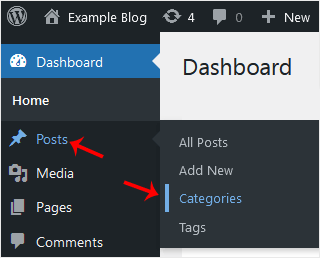
wp-dashboard-category-option.gif


3. Hover your mouse over a category you want to remove and click on Delete. The confirmation option will appear. Confirm with OK.
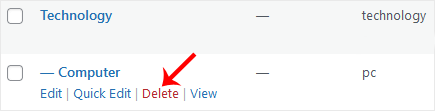
wp-remove-category-2.gif


Răspunsul a fost util?

Articole similare

How to Access the WordPress Admin Dashboard WordPress is an easy to work with CMS software. To access a WordPress account, please follow... How to Remove Sample Comments and Posts From WordPress You get sample comments and posts in a fresh WordPress install. You can easily remove them in the... How to Write and Publish Your First Blog Post in WordPress Writing your first blog post is a fascinating thing. Follow the steps below to do so in... How to Remove a Post in WordPress You can remove the published or draft post in WordPress.1. Log in to the WordPress dashboard. 2.... How to Bulk Delete Posts in WordPress It is possible to delete posts in bulk using WordPress. You can also delete selected posts in...
« înapoi

  Asistență

Tichetele mele
Anunțuri
Biblioteca de cunoștințe
Fișiere
Starea sistemelor
Deschide Tichet

Fiecare site are o poveste. HostCircuit se asigură că povestea ta rulează fără întreruperi. Găzduire web inteligentă, suport dedicat și performanță pe care te poți baza.

Live Chat
Address Icon

Locatie

Strada Barsei, nr. 14
Oradea, Jud. Bihor

Phone Icon

Telefon: 0749 143143

  • Trimite tichet
  • Email Icon

    [email protected]

    [email protected]

    Servicii oferite:

    • Gazduire Web
    • Reseller Web
    • Inregistrare domenii
    • Solutionarea Alternativa a Litigiilor

    Informații fiscale:

    • Cod Unic de Înregistrare:44310828
    • Nr. Înmatriculare: J2021001331052
    • Solutionarea Online a Litigiilor
    • Contact
    • Termenii și Condițiile Legale de livrare a Serviciilor

    Copyright © 2026 HostCircuit. Toate drepturile rezervate.


    se încarcă...
    se încarcă...

    Generare Parolă

    Vă rugăm să introduceți un număr între 8 și 64 caractere pentru lungimea parolei

